How to Redeem an iTunes Gift Card:
You will be doing this ONLY on your teacher iPad... Student iPads are done through Self-service.
1. On your Teacher iPad touch "App Store" App.
2. Scroll to the bottom of the "Featured" section in the App Store.
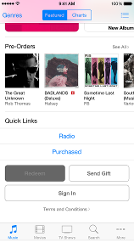
3. Tap "Redeem".
4. Sign in with your Apple ID.
5. Tap "Use Camera"
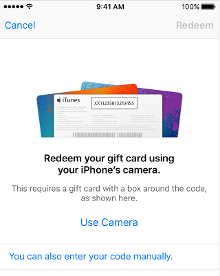
6. Peel off the label on the back of your gift card.
7. Hold the back of the card (where the sticker was) up to the camera.
8. The Camera reads and redeems the code. Your iTunes Store Balance appears onscreen.
9. In the upper right corner tap "done".
YAY! Now go get some really good apps!